Showing posts with label COBOL IF Statement. Show all posts

Thursday, 4 September 2014

COBOL Decision Making: IF, EVALUATE, and PERFORM Examples

A batch program reads an account record and must choose one path: accept it, reject it, route it to review, or skip it because the file reached end. COBOL decision making is the set of statements that makes that choice visible in the program: IF, EVALUATE, and PERFORM.

COBOL decision making diagram showing IF, EVALUATE, and PERFORM control flow
Pick the clear branch.

What is decision making in COBOL?

Decision making means testing data and running the matching statements. In a mainframe program, the tested data might be a file status, transaction code, account type, return code, amount, date, or user-selected action.

IBM groups IF and EVALUATE as statements for selecting program actions. Use them with explicit scope terminators such as END-IF and END-EVALUATE so the next developer can see where each decision ends.

When to use IF

Use IF when the program has one condition or two simple choices. IBM describes IF ... ELSE as the normal form for choosing between two processing actions. The word THEN is optional in COBOL, but many teams omit it for a cleaner style.

IF WS-FILE-STATUS = '00'
   PERFORM PROCESS-CUSTOMER
ELSE
   PERFORM WRITE-FILE-ERROR
END-IF

This is direct and easy to test. The branch names also tell the reader what business action happens, not only what low-level condition was true.

When to use EVALUATE

Use EVALUATE when there are three or more choices. IBM describes EVALUATE as a way to avoid nested IF statements and to code a case structure or decision table.

EVALUATE WS-ACTION-CODE
   WHEN 'A'
      PERFORM ADD-CUSTOMER
   WHEN 'C'
      PERFORM CHANGE-CUSTOMER
   WHEN 'D'
      PERFORM DELETE-CUSTOMER
   WHEN OTHER
      PERFORM WRITE-INVALID-ACTION
END-EVALUATE

WHEN OTHER should handle values that do not match a known action. It is also a good place to write a clear message, set a return code, or route the record to an error report.

IF vs EVALUATE at a glance

Need Best COBOL statement Reason
One test with one action IF Smallest clear form.
Two alternate actions IF ... ELSE Shows both paths without extra structure.
Menu code, status code, or many values EVALUATE Avoids long nested IF blocks.
Several conditions together EVALUATE TRUE or carefully written IF Keeps rule order visible.

Using EVALUATE TRUE for business rules

EVALUATE TRUE is useful when each WHEN contains a full condition. This reads like a rule list. Put the most specific rules first so a broad rule does not catch the record too early.

EVALUATE TRUE
   WHEN WS-FILE-STATUS NOT = '00'
      PERFORM WRITE-FILE-ERROR
   WHEN WS-ACCOUNT-BALANCE < ZERO
      PERFORM ROUTE-CREDIT-REVIEW
   WHEN WS-CUSTOMER-TYPE = 'VIP'
      PERFORM PROCESS-VIP-CUSTOMER
   WHEN OTHER
      PERFORM PROCESS-STANDARD-CUSTOMER
END-EVALUATE

IBM notes that WHEN phrases are tested in source order. That order is part of the program logic, so treat it like business code rather than formatting.

Where PERFORM fits

PERFORM does not choose by itself. It runs a paragraph, section, or inline block after a choice has already been made. A clear decision block often calls short named paragraphs with PERFORM.

IF WS-INPUT-VALID
   PERFORM UPDATE-CUSTOMER
ELSE
   PERFORM PRINT-REJECT-DETAIL
END-IF

That style keeps the decision near the data test and moves longer processing into named routines. IBM also recommends structured programming statements such as EVALUATE and inline PERFORM because they make control flow easier to follow.

Avoid hidden period bugs

Old COBOL often used periods to end scope. Modern COBOL is easier to review when each decision uses explicit endings. A period in the wrong place can end more than the reader expects.

IF WS-FOUND
   PERFORM PRINT-DETAIL
END-IF

PERFORM READ-NEXT-RECORD

Use END-IF, END-EVALUATE, END-PERFORM, END-READ, and similar scope terminators. The compiler accepts older styles, but a support team needs code that can be read quickly during an abend call.

CONTINUE vs NEXT SENTENCE

CONTINUE is a no-operation statement. Control moves to the next statement after the current scope. NEXT SENTENCE jumps to the statement after the next period. IBM warns that the two can behave very differently depending on where the next period appears.

IF WS-SKIP-RECORD
   CONTINUE
ELSE
   PERFORM PROCESS-RECORD
END-IF

Prefer CONTINUE when you need an empty branch. Avoid NEXT SENTENCE in new code unless your site standard has a very specific reason for it.

Common mistakes

Nesting too many IF statements

Three or four nested IF statements are easy to misread. If the code checks a menu value, status code, or action code, rewrite it as EVALUATE.

Forgetting WHEN OTHER

A new action code can arrive from a file or screen before the program is ready for it. WHEN OTHER gives the program a controlled reject path instead of silent fall-through.

Mixing decisions and long processing

A decision block should show the choice. Long update logic, reporting logic, and error handling usually belong in named paragraphs called by PERFORM.

Review checklist

  • Use IF for one or two choices.
  • Use EVALUATE for action codes, file statuses, menu choices, and decision tables.
  • Code WHEN OTHER for unexpected values.
  • Use explicit scope terminators such as END-IF and END-EVALUATE.
  • Keep branch bodies short and call named paragraphs with PERFORM.
  • Prefer CONTINUE over NEXT SENTENCE for empty branches.

Related Mainframe Forum guides

For connected COBOL topics, read COBOL PERFORM Statement, COBOL IF THEN ELSE, COBOL Complex Conditions, COBOL COMPUTE Statement, COBOL EXIT Verb, and COBOL Application Structure.

External references

IBM documents this topic in coding a choice of actions, using the EVALUATE statement, conditional statements, and structured programming guidance.

FAQ

What is decision making in COBOL?

Decision making is the use of statements such as IF and EVALUATE to choose which processing path should run.

Should I use IF or EVALUATE in COBOL?

Use IF for one or two choices. Use EVALUATE when a program has three or more choices, such as action codes or file statuses.

Why is END-IF useful?

END-IF makes the scope of the condition clear. It helps prevent mistakes caused by misplaced periods or nested conditions.

Is NEXT SENTENCE the same as CONTINUE?

No. CONTINUE does nothing and moves to the next statement. NEXT SENTENCE jumps to the statement after the next period.

COBOL IF Statement: Mastering COBOL If Statements with Syntax and Examples.

COBOL IF Statement is one of the important elements in the Cobol programming language. IF Statement in COBOL is a powerful construct that allows developers to make decisions based on different conditions. It is used to test one or more conditions and execute a block of code based on the result.

In this article, we will explore the different variants of COBOL IF Statements, their syntax, and examples. The article precisely talks about the COBOL IF Statement with Continue Clause, COBOL IF Statement with Next Sentence Clause, and COBOL IF statement with multiple conditions. So, without wasting time let's deep dive into the IF statement of COBOL.

COBOL IF Statement - Introduction.

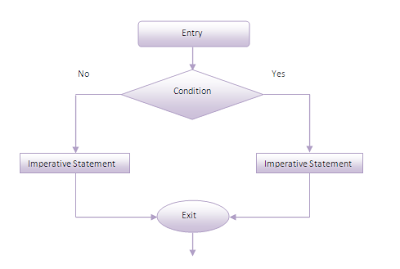
If statement in COBOL is an essential part of the programming because it facilitates the conditional execution of the code based on the evaluation of a specified condition. It means that the program can take different paths or actions depending on whether a condition is true or false, allowing for more complex and dynamic programming logic. The following diagram illustrates the importance of the if statement in COBOL.

IF END-IF Statement.
COBOL IF END-IF Statement.

Note: It is recommended that you should never use nested if's more than 3 levels deep because it would degrade the performance of the COBOL program. In such a scenario, you must consider using COBOL Evaluate statements.

Importance of COBOL IF Statement in Programming.

The COBOL If Statement offers a high degree of flexibility, as it can be combined with other statements and functions to provide more complex program logic. This can be especially useful in large and complex programs where different conditions may need to be evaluated at different stages. Another important aspect of the COBOL IF statement is that it helps in skipping unnecessary steps if a certain condition is not met. This can result in more efficient and streamlined code, which is easier to maintain.

Explanation of the syntax of COBOL If Statement.

The format of the IF Statement in COBOL is pretty simple and straightforward. In fact, COBOL If conditions have various formats and you can use these different variants as per business requirements. 


Basic Format:  IF condition [THEN] imperative statements
                  ELSE imperative statements
               END-IF


Note: An imperative statement as opposed to a conditional statement, is one that performs an operation regardless of any existing conditions.

NESTED IFs Statement in COBOL: The THEN and ELSE parts of an IF statement can contain other IF statements. The included IF statements in turn may also contain other IF statements. Such inclusion of one or more IF statements within the scope of an IF statement is called nesting of IF statements.

Format:  IF condition [THEN] imperative statements
            ELSE imperative statements
                 IF Condition
                    imperative statements
                 END-IF
         END-IF.


The following example illustrates the IF-ELSE-END-IF Statement in COBOL.

COBOL Nested Statements.
COBOL IF END-IF Statement Example.

Note: Always indent statements with the IF instruction to make programs easier to read and debug. 
Now, let's discuss each variant of COBOL If Statements. 

IF-THEN-ELSE in COBOL

The most basic form of the COBOL IF statement is the IF-THEN-ELSE structure. This structure performs operations based on a single condition. The format of this structure is as follows:
IF condition [THEN] imperative statements
   ELSE imperative statements
END-IF
Here, "condition" is a logical expression that evaluates to either TRUE or FALSE. If the condition is true, then the imperative statements under "THEN" are executed. If the condition is false, then the imperative statements under "ELSE" are executed. The "THEN" and "ELSE" parts of this structure are optional.

Nested IFs in COBOL.

The IF-THEN-ELSE structure can contain other IF statements, which are called nested IFs. This allows for more complex selection structures to be created. Here is the format of a nested IF structure:

IF condition [THEN]
   imperative statements
ELSE imperative statements
IF Condition
   imperative statements
END-IF
END-IF.

In this structure, the "ELSE" part can contain another IF statement. If the condition under "ELSE" is true, then the imperative statements under the nested IF statement are executed. The nested IF statement can also contain another IF statement, and so on. This is known as the nesting of IF statements.

COBOL IF Statement with Multiple Conditions.

The IF-THEN-ELSE structure can also handle multiple conditions, which are connected with logical operators such as AND and OR. Here is the format of the COBOL IF statement with multiple conditions:

IF condition-1 AND/OR condition-2 [THEN] 
    imperative statements
ELSE 
    imperative statements
END-IF


In this structure, "condition-1" and "condition-2" are logical expressions that are connected by the AND or OR operator. If both conditions are true, then the imperative statements under "THEN" are executed. If either condition is false, then the imperative statements under "ELSE" are executed.

COBOL IF Statement with Multiple Values.

In addition to multiple conditions, the COBOL IF statement can also handle multiple values. Here is the format of the COBOL IF statement with multiple values:

IF identifier-1 = value-1, value-2,...value-n [THEN] 
   imperative statements
ELSE 
   imperative statements
END-IF.

In this structure, "identifier-1" is a variable that is compared to a list of values. If the value of "identifier-1" matches any of the values in the list, then the imperative statements under "THEN" are executed. Otherwise, the imperative statements under "ELSE" are executed.

COBOL IF Statement with NEXT SENTENCE

The COBOL IF statement can also be used with the NEXT SENTENCE keyword, which skips the current statement and moves on to the next one after the period. Here is the format of the COBOL IF statement with the NEXT SENTENCE:

IF condition [THEN]
   NEXT SENTENCE | imperative statements
.

In this structure, if the condition is true, then the NEXT SENTENCE keyword is used to skip the current statement and move on to the next one. This can be useful for improving the readability of the code.

COBOL IF Statement with CONTINUE

The COBOL IF statement can also be used with the CONTINUE keyword, which skips the current statement and moves on to the next executable statement after the END-IF. Here is the format of the COBOL IF statement with the CONTINUE:

IF condition [THEN]
   CONTINUE | imperative statements
END-IF.

In this structure, if the condition is true, then the Continue keyword is used to skip the current statement and move on to the next one. This can be useful for improving the readability of the code.

Youtube Tutorial: COBOL Control Statements

The following Youtube tutorial video clearly explains various COBOL Control statements.   


Summary. 

In summary, COBOL If Statements are an important construct in programming that allows for the conditional execution of code based on specified conditions. They can help to reduce code complexity, improve efficiency, and offer a high level of flexibility for more complex programming logic.


Monday, 28 July 2014

COBOL Complex Conditions: AND, OR, NOT, and Parentheses

A COBOL IF statement can look correct and still send a record down the wrong path when AND, OR, and NOT are mixed without parentheses. Complex conditions are useful, but they need clear grouping so the business rule is readable in production code.

COBOL complex condition diagram showing simple conditions joined by AND OR NOT and a true path
Group the condition clearly.

What is a complex condition in COBOL?

A complex condition is a condition built by combining simple conditions with logical operators or by negating a condition. IBM lists AND, OR, and NOT as the logical operators used for this work.

Simple conditions include relation conditions, class tests such as IS NUMERIC, sign tests such as IS NEGATIVE, and condition-name tests such as 88-level names. A complex condition lets one IF test more than one fact.

Logical operators

Operator Meaning Example
AND Both conditions must be true. WS-AMT > ZERO AND WS-STATUS = 'A'
OR One or both conditions can be true. WS-TYPE = 'C' OR WS-TYPE = 'S'
NOT Reverses the truth value of a condition. NOT WS-AMT IS NUMERIC

Order of evaluation

IBM documents the default precedence as arithmetic operations first, then simple conditions, then NOT, then AND, then OR. Parentheses can change that order and make the intended rule obvious.

IF WS-STATUS = 'A'
   AND WS-BALANCE > ZERO
   OR WS-VIP-CUSTOMER = 'Y'
    PERFORM SEND-LETTER
END-IF

That condition may not mean what the reviewer expects. It is safer to group the rule.

IF (WS-STATUS = 'A' AND WS-BALANCE > ZERO)
   OR WS-VIP-CUSTOMER = 'Y'
    PERFORM SEND-LETTER
END-IF

Use parentheses for business rules

Parentheses are cheap. They prevent a maintainer from guessing whether the rule is driven by account status, balance, customer type, or all three.

IF WS-ORDER-AMOUNT > 1000
   AND (WS-CREDIT-STATUS = 'A'
        OR WS-MANAGER-APPROVED = 'Y')
    PERFORM RELEASE-ORDER
END-IF

Here the high order amount is always required. Either good credit status or manager approval can satisfy the second part of the rule.

Class and sign conditions

Class tests and sign tests make validation code easier to read. IBM documents class conditions such as IS NUMERIC and sign conditions such as IS POSITIVE, IS NEGATIVE, and IS ZERO.

IF WS-INPUT-AMOUNT IS NUMERIC
   AND WS-INPUT-AMOUNT IS POSITIVE
    PERFORM PROCESS-AMOUNT
ELSE
    PERFORM REJECT-RECORD
END-IF

Be careful with signed numeric fields and edited fields. A class test is not a substitute for understanding the field definition in the copybook.

Use 88-level names where they help

Condition-name entries can make a complex condition read like a business sentence. They are especially useful for status codes, record types, and yes/no flags.

01 WS-ACCOUNT-STATUS     PIC X.
   88 ACTIVE-ACCOUNT     VALUE 'A'.
   88 CLOSED-ACCOUNT     VALUE 'C'.

01 WS-ORDER-FLAG         PIC X.
   88 MANAGER-APPROVED   VALUE 'Y'.

IF ACTIVE-ACCOUNT
   AND (WS-BALANCE > ZERO OR MANAGER-APPROVED)
    PERFORM RELEASE-ORDER
END-IF

Abbreviated combined relation conditions

COBOL allows abbreviated combined relation conditions. IBM explains that the missing subject or relation operator can be taken from the last stated one. This can be compact, but it is also easy to misread.

IF WS-CODE = 'A' OR 'B' OR 'C'
    PERFORM VALID-CODE
END-IF

For beginner-friendly production code, the longer form is often clearer.

IF WS-CODE = 'A'
   OR WS-CODE = 'B'
   OR WS-CODE = 'C'
    PERFORM VALID-CODE
END-IF

Common mistakes

Mixing AND and OR without grouping

This is the most common readability problem. Add parentheses when both operators appear in the same condition.

Putting NOT in the wrong place

NOT A = B OR C is not the same as NOT (A = B OR A = C). Group negated conditions when the rule covers more than one comparison.

Writing a condition that hides the business term

If an IF spans many lines, consider 88-level condition names or a small validation paragraph with a clear name.

Review checklist

  • Use parentheses when AND and OR appear together.
  • Check the position of NOT.
  • Use 88-level names for status codes and flags.
  • Check class tests against the actual PIC and USAGE clauses.
  • Keep each line short enough to review in a normal editor.
  • Add test cases for each true and false branch.

Related Mainframe Forum guides

For nearby topics, read COBOL IF statement, COBOL EVALUATE statement, COBOL 88-level condition names, COBOL data types, COBOL CONTINUE and NEXT SENTENCE, and COBOL decision making.

External references

IBM documents complex conditions, combined conditions, and abbreviated combined relation conditions.

FAQ

What is a complex condition in COBOL?

A complex condition combines simple conditions with AND, OR, or NOT, or negates a condition.

Which operator is evaluated first in COBOL?

After arithmetic and simple conditions, COBOL evaluates NOT, then AND, then OR, unless parentheses change the order.

Should I always use parentheses?

Use parentheses when the condition mixes AND and OR, when NOT applies to a group, or when a reviewer could read the rule two ways.

Are 88-level names useful in complex conditions?

Yes. 88-level names make status-code and flag checks easier to read and reduce repeated literal comparisons.

New In-feed ads