Showing posts with label easytrieve tutorial. Show all posts

Monday, 29 July 2013

Easytrieve Basic Report Edit Field Definition.


Easytrieve.
Easytrieve Basic Report Edit Field Definition


HEADING Parameter

You use the HEADING parameter to specify an alternative column heading for a field. (The default column heading is the field-name.)

  • Place the alternate column heading within single quotation marks. For example,
CL-NAME               5       20       A      HEADING ‘CLIENT NAME’

Produce the column heading
          
  CLIENT NAME    

MASK

An edit mask is a pattern of characters specifying how non-alphanumeric data is to be printed. Alphanumeric fields cannot be edited. An edit mask is created using combinations of the following characters:

9     Formats digits.
Z     Suppresses Leading zeroes.
*     Replaces leading zeroes with an asterisk.
-     Prints a minus sign prior to the first non-zero digit of a
      negative number
$    Prints a currency symbol prior to the first non-zero digit.

Each digit in the field must be designated in the mask. Any character which follows the last character of the edit mask is printed if the field is negative.

Example
              Mask             Field         Result
              ------------ ------------ ------------
              $$, $$9        01234       $1,234

Defining Edit Masks

You can define standard edit masks when your system is installed.

       MASK                                     USE
 ‘(999) 999-9999’                 Telephone Number
 ‘999-99-9999’                    Social Security number

 ‘Z9 / 99 / 99’                   Date
 ‘$$, $$$, $$9.99                 CREDIT’ Money (with floating $)

 ‘*, ***, ***, 999.99-‘           Protected Check Amount
 ‘--, ---, -9.99’                 Negative Number

Syntax

[     MASK   [letter]   [BWZ]    [‘literal’]       ]
  • MASK is the EASYTRIEVE PLUS keyword.
  • Letter names the edit mask to follow. Once a mask is defined, it need not be defined again; simply use the letter.
  • BWZ (blank when zero) specifies that a field should not be printed if the entire field contains zeroes. BWZ must be coded whenever needed.
  • Literal is the format of the mask using the characters indicated on the previous page.
Redefining a Field

Sometimes it is necessary to break a field into several parts in order to get the exact information for your report. A birth date, for example, may have been originally entered as one field in a record. Now you want to access this information by either the month, day, or year. With EASYTRIEVE PLUS you can redefine that field in the following manner:

DATE-OF-BIRTH             103         6            N
    MONTH                 103         2            N
    DAY                   105         2            N
    YEAR                  107         2            N


DATE-OF-BIRTH | _ | 0 | 2 | 1 | 0 | 5 | 5 | _ | _ | _ | _ |
 position 103 105 107

 Start-location of New Fields
In this exhibit, the MONTH (02) starts in position 103 and occupies position 103 and 104. The DAY starts in 105 and occupies positions 105 and 106. Finally, YEAR starts in 107 and occupies 107 and 108.lves setting aside as an area of storage as a place to keep calculations or other information that is to be created during the running of an EASYTRIEVE PLUS program.

  • Define working storage by specifying W as the start location.
  • The values stored in this field are associated with each individual record.
Example

GROSS          30         4     N   2
NET            34         4     N   2
WORK-DEDUCT    W          4     N   2  HEADING ‘DEDUCTIONS’


EASYTRIEVE Tutorial || Easytrive Program Structure || Easytrieve Reporting Example.


Hello! and welcome back to another exciting tutorial on EASYTRIEVE Program. In this Easytrive tutorial, you'll learn the basic structure of an Easytrive program.  You'll get a flavor of the Easytrieve program.  Let's start with today's tutorial with an introduction to the Earyteive program sections.  

Easytrive Introduction.

Easytreive on the mainframe is a data retrieval programming language. Easytrieve is generally used for creating custom reports, extract data. Let's focus on an Easytrive sample reporting program. 

Easytrive Program Structure.

The Easytrive program generally has three different sections (i.e. environment section, library section, activity section). Each section has its own significance. Let's look at each section in detail. 

ENVIRONMENT Section.

An Easytrive Environment section optional. It is generally used to change the default parameters of the system environment. The PARM keyword is used to specify the new parameters. 

For example- PRAM LINK (EZTBPGM2)

LIBRARY Section.

The Easytrive Library section specifies the input and output file used in the program. This section is also used to define the working storage fields for the program logic.   

For example - FILE PERSNL  

Note: In the above mention example, PERSNL is the name of a file used in an easytrive program.

ACTIVITY Section.

The last section of an Easytrive program is the Activity Section. This is a mandatory section and it is to specify the business logic of the program. The activity section can have any number of small tasks in the form of paragraphs. Each paragraph represents a set of business rules or logic as per need.  

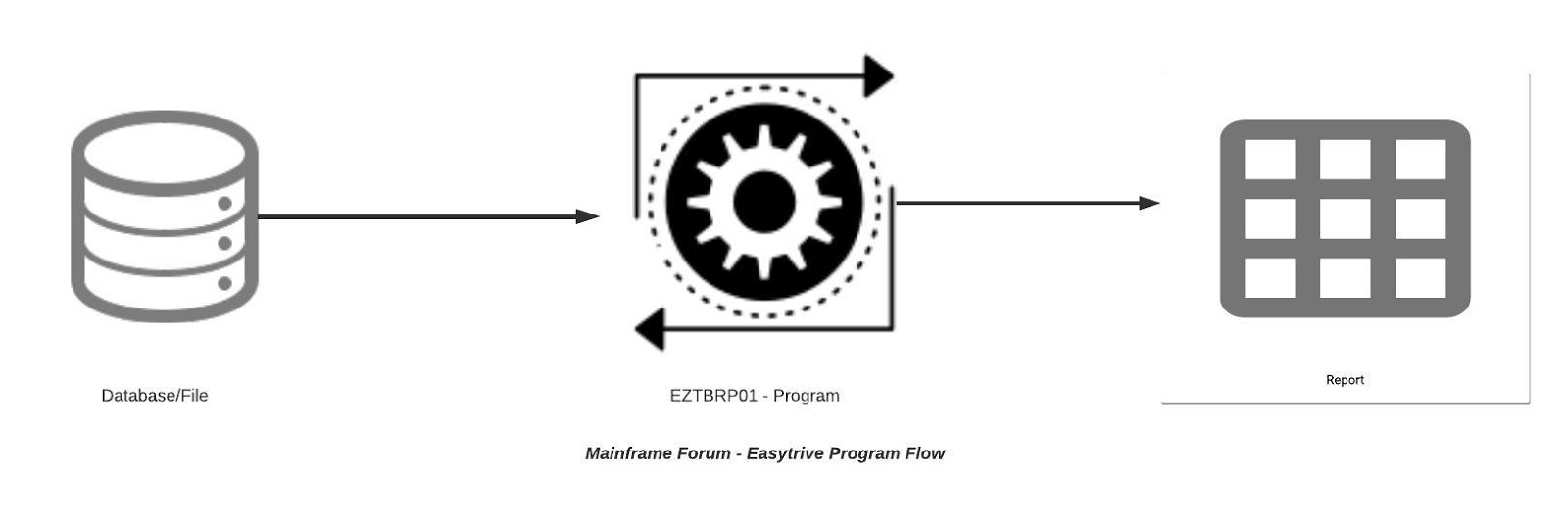
Mainframe Forum - Easytrieve Program Flow

Easytrive Sample Reporting Program.

  • Program Name: EZTBRP01
  • Description: EZTBRP01 is an easytrive program, that generates reports in specific formats.

*
 INPUT 
*
 FILE  PERSNL   FB   (150 1800) 
       NAME           17     20    A 
       EMP#           9       5    N 
       DEPARTMENT     98      3    N 
       NET            90      4    P  2  
       GROSS          94      4    P  2 
 JOB INPUT PERSNL NAME EXAMPLE-ONE 
 PRINT PAY-RPT 
*
 REPORT  JOB  INPUT  PERSNL  NAME  EXAMPLE-ONE 
 PRINT  PAY-RPT 
*   REPORT  PAY-RPT 
 TITLE 1 ‘PERSONNEL  REPORT  EXAMPLE  ONE’ 
 LINE 1 NAME  DEPARTMENT  EMP#  GROSS NET

REPORT OUTPUT 

4/16/86                PERSONNEL REPORT EXAMPLE ONE                   PAGE 1
 NAME             DEPARTMENT         EMP#              GROSS          NET
 NAGLE               935             00370             554.40         340.59 
 POST                911             00445             292.00         206.60 
 PETRIK              921             00577             220.80         154.70 

Sunday, 28 July 2013

EASYTRIEVE.- How EASYTRIEVE Plus Can Increase Your Profit!

Welcome back guys! 

In today's tutorial we will be discussion about  EASYTRIEVE PLUS which is a reporting tool and it's developed by CA Technology.  I would describe explain feature and capabilities of the EASYTRIEVE on Mainframe. So, lets start with the tutorial. 

EASYTRIEVE
EASYTRIEVE Plus Tutorial.

EASYTRIEVE PLUS is a data retrieval and reporting tool that offers incredible capabilities for both business and data processing professionals.

The information retrieval capabilities allow non-data processing personnel to generate reports that meet the information requirements of their organization.

The report composition capability of Easytrieve Plus not only enhance the productivity of professional but also save lot of time and cost to fulfill business requirement. One thing that I like about Easytrive programming is that you can run Easytrieve program without any compilation process you simply need to include program into JCL.

The data management and build choices of EASYTRIEVE PLUS make it an effective application development tool. You can use this powerful, fourth-generation language to:

Prototype applications 

  • Easytrive plus leads to instant design and quick development of production programs. 
  • Perform file maintenance on a wide variety of file and database.
  • Automatic report formatting without sacrificing flexibility. 
  • Production of unlimited reports from one pass of the the information.  
  • Edit masks, such as floating money symbols, check protection etc. 
  • Capability for special forms.
  • Complete conditional logic. 
  • Powerful calculation capabilities. 
  • User-friendly database interfaces to IMS, DLI, IDMS . 
  • Easytrieve Plus supports all types of data from any combination of files – sequential, ISAM, VSAM, or databases. 
  • Easytrive JCL can easily access data of fixed, variable, undefined or spanned record formats.
  • Easytrive Plus can random access of ISAM and VSAM files and databases. 

User-defined reports 

  • An unlimited number of input files 
  • Array processing

Ten Ways Easytrieve Program Structures Can Improve Your Business.

New In-feed ads