Showing posts with label File Status. Show all posts

Wednesday, 10 April 2019

VSAM - Virtual Storage Access Method Concepts.

VSAM Concept
Virtual Storage Access Method which is popularly known as VSAM. VSAM is one of several access methods in z/OS. It applies only to data stored on direct access storage devices (DASDs). 

VSAM access method is used for indexed files on an IBM mainframe. It was introduced by IBM in the 1970s. This access method makes it easier for an application to run an I/O operation (moving data between an I/O device and memory)

It is a high-performance access method used to organize data in the form of files in Mainframes.

The word virtual means only that VSAM was introduced at approximately the same time as the initial IBM virtual storage operating systems OS/VS1 and OS/VS2. Since then VSAM has been continually improved and enhanced.

It provides a catalog facility that can be used for both VSAM and non-VSAM files. And it provides a multi-function utility program called Access Method Services (AMS) that lets you perform a variety of functions for VSAM as well as non-VSAM files.


VSAM
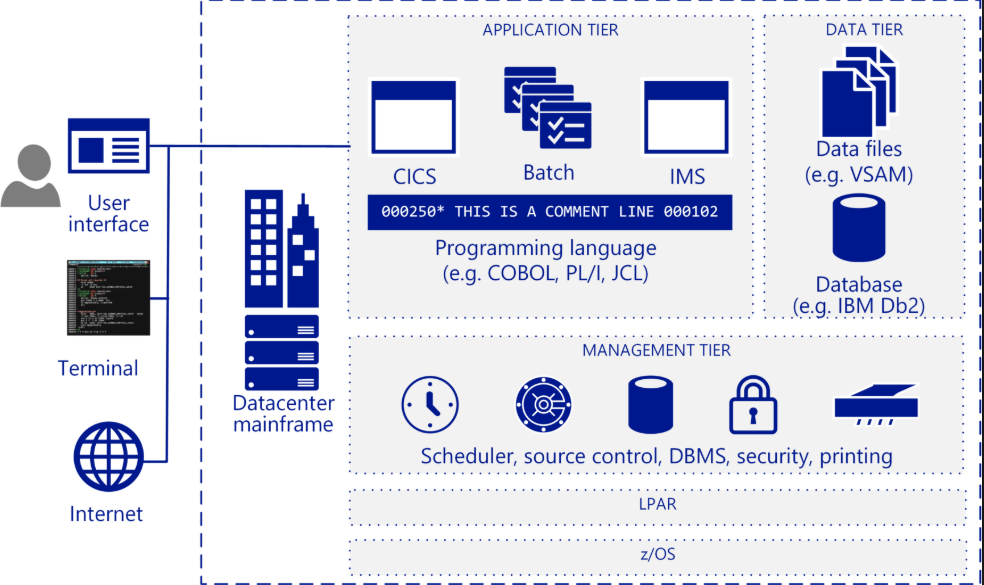
IBM Mainframe Architecture.


Type of Data set:


VSAM data sets are broadly categorized into 4 categories.
  1. ESDS: Entry-sequenced data set (ESDS), the records are stored one after the other in consecutive disk locations. On other platforms, this is called a sequential file.To retrieve records from a sequential file, you must read them sequentially by disk location. This type of record retrieval is referred to as sequential access.
  2. KSDS: A key-sequenced data set (KSDS) consists of two parts: an index component and a data component. Within the index component, each entry contains a key field value that points either to a lower-level index or to a record in the data component of the file. On other platforms, this type of data set is called an indexed file.
  3. RRDS: A relative-record data set (RRDS) consists of record areas that can contain one record. Each of these areas is identified by a relative record number that indicates its relative position in the file. On other platforms, this type of data set is called a relative file.
  4. LDS: A Linear data set (LDS) contains data that has no record boundaries. Linear data sets contain none of the control information that other VSAM data sets do. Linear data sets must be cataloged in an integrated catalog facility catalog.
Salient Feature: 
  • The retrieval of records is faster because of an efficiently organized index. The  index is small because of key compression algorithm used to store and retrieve records
  • Embedded free space makes the insertion of records easy  and  therefore requires less reorganization
  • The deletion of records means that they are physically deleted thus allowing the reclaiming of free space within data sets
  • Records can be accessed randomly by key or address  and can also be accessed sequentially at the same time
  • VSAM data sets can be shared across partitions, regions, address space and systems. The type and level of sharing can be controlled thru AMS and JCL
  • VSAM provides data security thru passwords protection of data sets at various levels like reading an update.
  • VSAM provides the ability to physically distribute datasets over various volumes based on key ranges.
  • VSAM data sets are device  independent

Drawbacks:
  • Free spaces, hence more disk space
  • The integrity of VSAM data sets in cross systems and cross regions sharing   must be controlled by the User.


Have a look of Top 20 Interview Questions for VSAM (Virtual Storage Access Method)..

Saturday, 6 April 2019

Top 20 Interview Questions for VSAM (Virtual Storage Access Method)


Top 20 Interview Questions.
Top 20 Interview Questions for VSAM.


Interview Questions


Q.
What are the types of VSAM DataSets?
A. Entry sequenced DataSets (ESDS), Key sequenced DataSets (KSDS) and relative record (RRDS), LDS (linear Data Set).
Q. Why do VSAM take more disk space than other utilities?
A. VSAM increases the disk space requirements of systems. This is because VSAM offers certain capabilities like partial self-reorganization to make things more efficient in data sets that can be modified.
Q. What are the distinctive features of a KSDS, Key sequenced DataSet?
A. The index and the distributed free space. CI and CA split upon updates. Record length may be changed during the update. The records are accessed by a particular Key.
Q. How are records stored in an ESDS, entry sequenced DataSet?
A. They are stored without respect to the contents of the records and in the order in which they are included in the file.
Q. What's an LDS (Linear Data Set) and what's it used for?
A. LDS is a VSAM DataSet in name only. It has unstructured 4k (4096 bytes) fixed size CIs which do not contain control fields. There is no free space, and no access from Cobol. LDS is essentially a table of data maintained on disk. The 'table entries' must be created via a user program and can only be logically accessed via a user program. When passed, the entire LDS must be mapped into storage, then data is accessed via base and displacement type processing.
Q. In ESDS, do we have the facility of accessing the records randomly?
A. YES, Random access to records is possible. Records, however, cannot be deleted. We can do it by referring to the RBA (relative byte address).
Q. Why is space is kept in the data component of the KSDS DataSet?
A. Free space specified during the allocation of the KSDS is left at regular intervals during the initial load of the data set. This space helps keep the data component in physical sequence in spite of random insertions.
Q. What is the difference b/w the ESDS and KSDS?
A. ESDS doesn’t have embedded free space.
The KEYS parameter has no meaning in the context of ESDS ESDS has no index component. An additional parameter, NONINDEXED is used to tell AMS that an ESDS is being allocated.
Q. How is LDS different from ESDS?
A. An LDS is a data set, very similar to an ESDS without the control information.It has no records and used for fast random access. It takes advantages of the computer’s very fast paging hardware for retrieval and storage and the bytes are implicitly divided into 4K blocks or pages, and the paging hardware reads and writes blocks from disk. There is no free space, unused space, control field in LDS.
Q. What is a CI, Control Interval?
A. A Control Interval is the unit of information that VSAM transfers between virtual and auxiliary storage.
Q. What is Control Interval Split?
A. A new record stored in the same CI, only if there is enough space. If not VSAM locates the free CI within the same CA, moves approximately half of the records to next CI and stores the new record at the correct position. This is called Control Interval Split. Whenever CI split occurs the sequence set is updated.
Q. What is a CA, control area?
A. A group of Control Intervals makes up a control area.
Q. If the records are larger than the CI size, for ex. if a record extends CI boundary and extends unto 3 CI, and there is still some space left in last i.e. third CI, will that be used by other CI DataSets?
A. NO. Some records are larger than the CI size, the records extend across CI boundaries (only for ESDS and KSDS). A spanned record begins on a CI boundary and it occupies two or more CIs in a CA. The unused space in the last CI can only be used to extend the record, it cannot contain any other record i.e. a new record has to be added in a new CI.
Q. What is a sequence set?
A. This is the part of the index that points to the CA and CI of the record being accessed.
Q. What is a cluster?
A. A cluster is the combination of the index, sequence set and data portions of the DataSet. The operating system gives program access to the cluster, i.e. to all parts of the DataSet simultaneously.
Q. What is the index set?
A. This is the other part of the index. It has multiple levels with pointers that ultimately reach to the sequence set.
Q. What is a Catalog?
A. The catalogue contains the names of all DataSets, VSAM and non-VSAM. It is used to access these datasets.
Q. What is an alternate index?
A. An AIX is a file that allows access to a VSAM DataSet by a Key other than the primary one. The alternate Key-pointer pair records are stored in an index cluster. This index cluster is known as the alternate index. The alternate Key-pointer pair records are loaded into the alternate index cluster
by the command BLDINDEX.AIX can be built over a KSDS and ESDS, but not over an RRDS.
Q. What could be the maximum number of the AIXs per base cluster?
A. There can be a maximum of 253 AIXs per base cluster. It is not advisable to have more than 5 AIXs per base cluster because of additional overhead during updates and retrievals.
Q. Can AIX be defined over an ESDS, which does not have any Key?
A. Although an ESDS does not have a primary Key, an AIX can be defined over an ESDS. In the case of an ESDS it is the relative byte address of the corresponding record in the base cluster that is stored.
Q. Can we access records in VSAM only by a single Key, i.e. primary Key?
A. It is also possible to access the records in a sequence other than that of the primary Key. Such Keys are called alternate Keys and they can be non-unique. For Example, in a pay-roll system where employee number is the unique primary Key and the employee name as alternate Key.
Q. What is the 'verify' command in the VSAM files ?
A. This command is used to close those files that are kept open after the abnormal termination of the file. It also brings the index component in sync with the data components and updates the catalog.
Q. What is a path?
A. A path is a file that allows you to access a file by alternate index - the path provides an association between the AIX and the base cluster.
Q. What is the upgrade set?
A. The upgrade set is the list of all AIXs that VSAM must maintain for a specific base cluster, so that when data in the base cluster is updated, the AIX files are also updated.
Q. What is free space?
A. Free space is reserved within the data component of a KSDS to accommodate inserting new records.
Q. What is IDCAMS? and what is the purpose of it?.
A. IDCAMS, also known as Access Method Services, is used to perform the following tasks:
  * Create a VSAM data set, VSAM alternate index, or catalog.
  * List a catalog entry for a data set, DataSet/catalog contents.
  * Copy a DataSet or catalog .
  * Convert non-VSAM to VSAM data set .
  * Load a VSAM DataSet from VSAM records
  * Rename VSAM data sets.
Q. What is a VSAM split?
A. If there isn't enough space in the Control Interval VSAM performs a Control Interval split by moving some records to the free Control Intervals. If there isn't a free Control Interval VSAM performs a control area split by allocating a new control area and moving half of the Control Intervals to it.
Q. What is the base cluster?
A. The base cluster consists of the data component and the index component for the primary index of a KSDS.
Q. What will happen if there is no secondary allocation made for DataSets?
A. VSAM will inform COBOL program of the problem and terminate the processing of the program.
Q. Why CI and CA splits are not possible in ESDS and RRDS?
A. In ESDS the new record is added at the end of last record. And no imbedded free space is allocated at the time of DataSet definition. In the case of RRDS the slots for the records are preallocated and so the CI and CA split is not possible.
Q. Do primary Key values have to be unique? Do alternate Key values have to be unique?
A. Primary Key values must be unique; alternate Key values need not be.
Q. In the COBOL SELECT statement what is the ORGANIZATION for a KSDS?
A. The ORGANIZATION is INDEXED.
Q. In the COBOL SELECT statement for a KSDS what are the three possibilities for ACCESS? 
A. ACCESS can be SEQUENTIAL, RANDOM or DYNAMIC.
Q. What is the COBOL RECORD KEY clause?
A. The RECORD KEY in the SELECT clause identifies the files primary Key as it will be known to the program.
Q. What is the purpose of the FILE STATUS clause in the SELECT statement?
A. The FILE STATUS field identifies the field that VSAM uses to provide information about each I/O operation for the file.
Q. If you wish to use the REWRITE command how must the VSAM file be opened?
A. It must be opened I/O mode.
Q. Explain the meaning and syntax for the START command?
A. The START command is used to read other than the next VSAM record. A value must be moved into the RECORD KEY. The KEY clause is optional, but it can be used to specify  relational (equal, less than, etc.) operator.
Q. What is the meaning of dynamic processing?
A. It means one program uses both sequential and random processing for a VSAM KSDS file. It's rarely used.
Q. Name some common VSAM error conditions and codes?
A. They are end of file (10), duplicate Key (22), record not found (23), Out of space condition is raised (28) ,VSAM logic error (90), open problem (92) and space problem (93).
Q. What is the VSAM-code field?
A. It is a COBOL II enhancement to VSAM batch processing expanding the FILE STATUS field. It is defined in WORKING - STORAGE as a six byte group item with three two byte elements, the normal return code, the function code and the feedback code.
Q. What is a VSAM slot?
A. A relative record DataSet (RRDS) consists of a specified number of areas called slots. Each slot is identified by a relative record number (RRN) which indicates its relative position in the file.
Q. What is the utility program closely associated with VSAM?
A. IDCAMS, the access method services utility.
Q. There are at least seven IDCAMS commands; name and explain each of them?
A. ALTER modifies information for a catalog, alternate index, cluster or path.
BLDINDEX builds the alternate index, of course.
DEFINE is used for ALTERNATEINDEX, CLUSTER or PATH.
DELETE removes the catalog entry for a catalog, cluster, alternate index or path.
LISTCAT lists information about the DataSet.
PRINT prints the DataSet contents.
REPRO copies records from one file to another.
Q. What are the three levels of definition for the VSAM DEFINE?
A. They are DEFINE CLUSTER, DATA and INDEX.
Q. What is the significance of the SHAREOPTIONS parameter?
A. It specifies how the file may be shared between jobs and between batch and CICS environments.
Q. What is the meaning of the DEFINE MODEL parameter?
A. It specifies whether the MODEL parameter allows you to model your cluster by modelling it after an existing cluster.
Q. How do you fix the problem associated with VSAM out of space condition?
A. 1. Define new VSAM DataSet allocated with more space.
2. Use IDCAMS to REPRO the old VSAM file to new VSAM DataSet.
3. Use IDCAMS to ALTER / rename the old VSAM DataSet or set IDCAMS to DELETE the
old VSAM DataSet.
4. Use IDCAMS to ALTER / rename the new VSAM DataSet to the name of the original
VSAM DataSet.
Q. In how many ways can you load the data in a VSAM cluster?
A. 1. Using the REPRO command.
2. Using COBOL program
Q. What is the REPRO command?
A. While a new cluster is created using IDCAMS, cluster will be empty. By using the REPRO command, we can load records into the cluster.

REPRO is Used to :
• Copy DataSets (VSAM or NON-VSAM), copy catalogs.
• Convert sequential and index sequential DataSets to VSAM format
• Convert VSAM and Index sequential DataSets to sequential format
• Backup VSAM catalog
• Read a backup copy of VSAM catalog
Q. Is it slower if you access a record through ALTERNATIVE INDEX as compared to Primary INDEX?
A. YES. Because the alternate Key would first locate the primary Key, which in turn locates the actual record. Needs twice the number of I/Os.
Q. What is RECOVERY and SPEED parameters in DEFINE CLUSTER command?
A. RECOVERY (default) and SPEED are mutually exclusive. Recovery pre-formats the control areas during the initial DataSet load, if the job fails, you can restart but you must have a recovery routine already written to restart the job. SPEED does not pre-format the CAs. It is recommended that you specify SPEED to speed up your initial data load.
Q. What is a SHAREOPTIONS parameter (SHR) in Define Cluster command.
A. It defines the cross-region and cross-system sharing capabilities of the DataSet. Syntax is SHR
(CRvalue CSvalue)
1 means multiple read OR single write (read integrity)
2 means multiple read AND single write (Write integrity)
3 means Multiple read AND multiple write
4 is same as 3, which refreshes the buffer with every random access. Default is SHR (1 3).
Q. What are the optional parameters to the input DataSet While loading the empty cluster with the data records?
A. i)  Skip and Count

Syntax:
SKIP(2)
COUNT(4)
In this case, the first two records are skipped and the next four records are printed. The default for SKIP is 0, and for COUNT will be printing records from beginning to end.

ii) FromKey and ToKey

PRINT -
INDATASET (CUSTOMER.KSDS.CLUSTER) -
FROMKEY (111111) -
TOKEY (444444)
Will print all records with Key value ranging from 111111 to 444444.

iii) FROMADDRESS and TOADDRESS

iv) FROMNUMBER and TONUMBER
Q. What does GDG mean in VSAM?
A. Generation Data Group
Q. Is a delete operation possible in an ESDS? Is rewrite operation possible in ESDS ?
A. No. Delete operation is not possible in VSAM ESDS. Yes, rewrite operation is possible in an ESDS
Q. Can VSAM files be deleted with the DELETE option of the DISPOSITION parameter of JCL?
A. No, you have to give a separate DELETE command in the VSAM cluster.
Q. How many buffers are allocated to VSAM KSDS and ESDS?
A. 2 data buffers by default for ESDS. For KSDS it allots 2 data buffers and 1 index buffers. Each buffer is about 4k.
Q. What are the codes returned by the AMS (Access Method Services) command during the execution?
A. Every AMS command issues a condition code. If multiple commands are being executed successively, there might be a requirement to execute or bypass certain commands on the success or failure of a previous command.

0 - The function was executed successfully
4 - A problem was encountered while executing the function, WARNING
8 - The requested function was executed, but major specifies were unavoidably bypassed,
ERROR
12 - The requested command could not be performed because of a logical error, SEVERE
16 - A severe error occurred causing the remainder of the command stream to be
bypassed., FATAL.


Top 20 Interview Questions for VSAM Share
Share VSAM Interview Questions.


Monday, 28 July 2014

COBOL File I/O Modes: INPUT, OUTPUT, I-O, and EXTEND

A batch job often fails before the first business rule runs because the file was opened in the wrong mode. A program that needs to read customer records should not use OPEN OUTPUT. A program that appends audit records should not recreate the file. In COBOL, the OPEN mode tells the runtime what the program plans to do with the file.

COBOL file I/O modes diagram showing INPUT OUTPUT I-O and EXTEND choices
Choose the mode first.

What are COBOL file I/O modes?

COBOL file I/O modes are the phrases used with the OPEN statement: INPUT, OUTPUT, I-O, and EXTEND. They decide which file statements are valid after the file is open. If the wrong mode is used, later READ, WRITE, REWRITE, or DELETE statements can fail or damage data.

OPEN INPUT  CUSTOMER-FILE
OPEN OUTPUT REPORT-FILE
OPEN I-O    MASTER-FILE
OPEN EXTEND AUDIT-FILE

Good file handling is simple: open the file in the mode that matches the next operation, check FILE STATUS, process the records, and close the file before the program ends.

Quick comparison

OPEN mode Use it when Common valid statements Main risk
INPUT The program only reads an existing file. READ Fails if a required file is missing.
OUTPUT The program creates a new file or replaces old records. WRITE Can clear existing records when used on the wrong file.
I-O The program reads records and updates them. READ, REWRITE, DELETE Can fail when the organization or access mode does not allow updates.
EXTEND The program appends new records after the last record. WRITE Fails for a missing non-optional file and is not valid for every file type.

OPEN INPUT: read an existing file

Use OPEN INPUT when the program reads records and does not change the file. A daily balance report, customer extract reader, or validation job usually opens the input file this way.

SELECT CUSTOMER-FILE ASSIGN TO CUSTIN
    FILE STATUS IS WS-CUST-STATUS.

OPEN INPUT CUSTOMER-FILE
IF WS-CUST-STATUS NOT = "00"
   DISPLAY "CUSTOMER OPEN FAILED: " WS-CUST-STATUS
   GOBACK
END-IF

If the required data set is missing, a typical status is 35. If the file is declared OPTIONAL, the open can succeed with a different status, so support teams should check the program's SELECT clause before assuming the JCL is wrong.

OPEN OUTPUT: create or replace records

Use OPEN OUTPUT for a new output file, such as a report, extract, or unload file. Be careful with existing files. On many jobs, opening an existing file for output means the old contents are replaced by new data.

SELECT REPORT-FILE ASSIGN TO REPTDD
    FILE STATUS IS WS-REPT-STATUS.

OPEN OUTPUT REPORT-FILE
IF WS-REPT-STATUS = "00"
   WRITE REPORT-REC
ELSE
   DISPLAY "REPORT OPEN FAILED: " WS-REPT-STATUS
END-IF

This is the mode that deserves the most review in production changes. A wrong DD name or copied program can point OPEN OUTPUT at a valuable file and replace records that were meant to be kept.

OPEN I-O: read and update records

Use OPEN I-O when the same file is read and changed. A VSAM KSDS maintenance program may read a customer master record, change a field, and then issue REWRITE. A delete program may read a key and then issue DELETE.

OPEN I-O CUSTOMER-MASTER
IF WS-MASTER-STATUS NOT = "00"
   DISPLAY "MASTER OPEN FAILED: " WS-MASTER-STATUS
   GOBACK
END-IF

READ CUSTOMER-MASTER
   INVALID KEY DISPLAY "CUSTOMER NOT FOUND"
END-READ

REWRITE CUSTOMER-MASTER-REC
   INVALID KEY DISPLAY "REWRITE FAILED"
END-REWRITE

I-O is not a shortcut for every file. The file organization, access mode, and data set allocation must support update processing. If a file is sequential and the program only needs to append new rows, EXTEND is often the clearer choice.

OPEN EXTEND: append new records

Use OPEN EXTEND when the program must keep existing records and add new records at the end. Audit logs, transaction history files, and daily append files often use this mode.

OPEN EXTEND AUDIT-FILE
IF WS-AUDIT-STATUS = "00"
   MOVE WS-AUDIT-TEXT TO AUDIT-REC
   WRITE AUDIT-REC
ELSE
   DISPLAY "AUDIT OPEN FAILED: " WS-AUDIT-STATUS
END-IF

If the file may not exist yet, review whether the file should be defined as OPTIONAL. IBM documents different open results for available and unavailable files, so this choice should be deliberate rather than left to a copied file definition.

File status codes to check after OPEN

Every production COBOL program should check FILE STATUS after OPEN. The exact value depends on file organization and runtime behavior, but these statuses appear often in support work.

Status Typical meaning during OPEN First check
00 Open completed normally. Continue processing.
05 Optional file was not available, but open processing continued. Confirm whether SELECT OPTIONAL is intended.
35 Required file was not found or not available. Check the DD statement, catalog entry, and data set name.
39 File attributes do not match the COBOL description. Compare RECFM, LRECL, keys, and record layout.

JCL checks before changing the mode

The COBOL source is only half of the story. The DD statement must point to the right data set and allow the intended action. Before changing an open mode, check the production JCL and scheduler variables.

//CUSTIN   DD DSN=PROD.CUSTOMER.INPUT,DISP=SHR
//REPTDD   DD DSN=PROD.REPORT.DAILY,
//            DISP=(NEW,CATLG,DELETE),
//            SPACE=(CYL,(5,2)),
//            DCB=(RECFM=FB,LRECL=133)

For read-only files, DISP=SHR is common. For new output files, the job often uses DISP=(NEW,CATLG,DELETE). For update jobs, review enqueue rules, restart behavior, and whether another job can read the same data set while updates are running.

Common mistakes

Opening an input file as OUTPUT

This is the dangerous one. A copy-paste change can replace a file that should only be read. Review OPEN OUTPUT statements carefully during code review.

Skipping FILE STATUS after OPEN

If the program does not test the status, the next READ or WRITE may fail far away from the real problem. Log the DD name and status so production support can act quickly.

Using EXTEND when the file is not optional

OPEN EXTEND can fail when a required file is missing. If the first run should create the file, define and test that behavior before the job reaches production.

Practical rule for choosing the mode

  • Use INPUT when the program only reads.
  • Use OUTPUT when the program creates a new result or intentionally replaces old contents.
  • Use I-O when the program reads existing records and updates or deletes them.
  • Use EXTEND when the program keeps existing records and appends new ones.
  • Always check FILE STATUS immediately after the OPEN.

Related Mainframe Forum guides

For the next file-handling topics, read COBOL File Operation, COBOL OPEN Statement, COBOL READ Statement, COBOL File Status, COBOL File Organization, and COBOL FD Entries.

External references

IBM documents these details in the Enterprise COBOL OPEN statement, OPEN statement notes, and opening ESDS, KSDS, and RRDS files pages.

FAQ

Which COBOL open mode is used for reading?

Use OPEN INPUT when the program only needs to read records from an existing file.

Which COBOL open mode appends records?

Use OPEN EXTEND when the program needs to add records after the last existing record.

Can COBOL read and update the same file?

Yes, but the file must be opened with OPEN I-O, and the file organization and access mode must support the update operation.

Why is OPEN OUTPUT risky?

OPEN OUTPUT is risky because it can replace existing records. Use it only when the job is meant to create a fresh output file or clear old contents.

COBOL Indexed File Organization: RECORD KEY and READ Examples

A customer inquiry screen usually cannot read a file from the first record until it finds account 000417. The program needs to place a key value in a field, issue a keyed read, and get the matching record. That is the job of COBOL indexed file organization.

COBOL indexed file organization diagram showing a program using RECORD KEY to read a VSAM KSDS record
Key lookup plus ordered reads.

What is a COBOL indexed file?

An indexed file stores records with one or more key fields inside the record. The prime key identifies the record, and the index gives COBOL a logical path to the data. On z/OS, this is commonly coded for a VSAM key-sequenced data set, or KSDS.

IBM documents indexed organization as a file type where each record has embedded keys and each key is associated with an index. The prime key must be unique, and COBOL uses the RECORD KEY clause in FILE-CONTROL to name that field.

When indexed organization fits

Use an indexed file when the program needs direct lookup by key and also needs to process records in key order. A batch job can read the file from the lowest customer number to the highest, while an online or inquiry-style program can read one customer directly by account number.

Need Indexed file fit
Read one employee by employee number Good fit because the prime key points to one record.
Print all accounts in account number order Good fit because sequential access follows key order.
Read by department as a second path Possible with an alternate record key when the file design supports it.
Read every record once with no key lookup A plain sequential file may be simpler.

FILE-CONTROL for an indexed file

The indexed file definition belongs in the FILE-CONTROL paragraph. The important parts are ORGANIZATION IS INDEXED, an access mode, a RECORD KEY, and a file status field.

ENVIRONMENT DIVISION.
INPUT-OUTPUT SECTION.
FILE-CONTROL.
    SELECT CUSTOMER-FILE
        ASSIGN TO CUSTKSDS
        ORGANIZATION IS INDEXED
        ACCESS MODE IS DYNAMIC
        RECORD KEY IS CUSTOMER-ID
        ALTERNATE RECORD KEY IS CUSTOMER-ZIP
            WITH DUPLICATES
        FILE STATUS IS WS-CUST-STATUS.

ACCESS MODE IS DYNAMIC lets the program switch between keyed lookup and ordered reading. Use RANDOM when the program only reads by key. Use SEQUENTIAL when the program only walks the file in key order.

Record layout example

The key field named in RECORD KEY must be part of the record description. In this example, CUSTOMER-ID is the prime key. CUSTOMER-ZIP is an alternate key that can return more than one record when duplicates are allowed.

DATA DIVISION.
FILE SECTION.
FD  CUSTOMER-FILE.
01  CUSTOMER-RECORD.
    05 CUSTOMER-ID        PIC X(10).
    05 CUSTOMER-NAME      PIC X(30).
    05 CUSTOMER-ZIP       PIC X(05).
    05 CUSTOMER-BALANCE   PIC S9(7)V99 COMP-3.
    05 FILLER             PIC X(40).

Random READ by prime key

For a direct lookup, move the wanted key value into the record key field before the READ. A status of 00 means the record was found. A status of 23 commonly means the key was not found for indexed and relative files.

MOVE '0000000417' TO CUSTOMER-ID

READ CUSTOMER-FILE
    INVALID KEY
        DISPLAY 'CUSTOMER NOT FOUND: ' CUSTOMER-ID
    NOT INVALID KEY
        PERFORM DISPLAY-CUSTOMER
END-READ

START and READ NEXT

START positions the indexed file at a key. READ NEXT then reads forward from that point. This pattern is useful for range processing, such as all customers from account 000400 upward or all keys in a department sequence.

MOVE '0000000400' TO CUSTOMER-ID

START CUSTOMER-FILE
    KEY IS GREATER THAN OR EQUAL TO CUSTOMER-ID
    INVALID KEY
        MOVE 'Y' TO WS-END-OF-FILE
END-START

PERFORM UNTIL WS-END-OF-FILE = 'Y'
    READ CUSTOMER-FILE NEXT RECORD
        AT END
            MOVE 'Y' TO WS-END-OF-FILE
        NOT AT END
            PERFORM PROCESS-CUSTOMER
    END-READ
END-PERFORM

Alternate record keys

An alternate key gives the program a second path into the same indexed file. For example, the prime key may be employee number, while an alternate key may be department. IBM notes that alternate keys can be used to access records in a sequence other than the prime-key sequence.

Alternate keys can be unique or can allow duplicates. If duplicates are allowed, the program must be written to handle more than one matching record. Do not add alternate indexes casually; each insert, delete, or key-changing update has more index work to maintain.

File status checks

Indexed files need clear file status handling because a failed keyed read is not always a program failure. A missing customer record may be a normal business case, while an open error or duplicate prime key on write should usually stop the job or return a controlled error.

Status Meaning in common indexed-file logic
00 Successful operation.
02 Successful operation with a duplicate alternate key condition.
10 End-of-file during sequential reading.
22 Duplicate key on write or rewrite.
23 Record not found for a keyed operation.

Indexed vs sequential vs relative files

A sequential file is best when the program reads records in stored order and does not need direct lookup. A relative file is best when the record number itself is the access path. An indexed file is the normal COBOL choice when the business key matters.

Read COBOL Sequential File Organization and COBOL Relative Organization for the nearby file organization choices.

Common mistakes

Changing the prime key during REWRITE

The prime key identifies the record. Do not design update logic that changes the prime key inside a rewrite path. Delete and recreate only when the application design and recovery rules allow it.

Using random access for range work

Random access is right for one key. For a range, use START and READ NEXT. That keeps the program in key order and avoids repeated single-record calls when a sequential pass would be cleaner.

Ignoring alternate-key duplicates

If the alternate key allows duplicates, one key value can represent several records. Code the loop and stop condition carefully, especially for department, location, state, or date fields.

Related mainframe topics

For more COBOL file handling, read COBOL File Operation, COBOL File I/O Modes, COBOL File Status, COBOL Fixed and Variable Records, VSAM IDCAMS Program, and when to use VSAM KSDS, ESDS, RRDS, and LDS.

External references

Technical notes in this refresh were checked against IBM COBOL file organization documentation, IBM access mode rules, IBM VSAM indexed file coding, and IBM alternate key guidance.

FAQ

What is indexed file organization in COBOL?

It is a file organization where records contain key fields and an index provides the path to retrieve records by key or read them in key order.

What is RECORD KEY in COBOL?

RECORD KEY names the prime key field for an indexed file. The program uses that key field for direct access and ordered processing.

Can indexed files be read sequentially?

Yes. Indexed files can use sequential, random, or dynamic access. Sequential access reads records in key order.

When should I use START in COBOL?

Use START when the program needs to position an indexed file at a key before reading the next records in sequence.

Sunday, 4 August 2013

VSAM Control Interval


Control Interval Control Interval in VSAM is a unit of data that is transferred when an I/O request is made between auxiliary storage and virtual storage.

It contains records, free space and controls information. The data records are grouped into control intervals.

That is in other words in the non-VSAM method the unit of data that is transferred between memory and the storage device is defined by the block which in contrast in VSAM is referred to as Control Interval.

The records in the Control Interval are all placed at the beginning of the Control Interval with the key of each record followed by the actual record.

The end portion of the Control Interval is occupied by control interval descriptor this also has space for specifying the record length of each record in the Control Interval.

The space between this beginning part which is occupied by records and the end part of the control interval which has descriptor followed by the length of record denotes the free space.

This is shown diagrammatically below:

Key 1Record 1
Key 2Record 2
Key 3Record 3

Free Space

Length of Record 1
Length of Record 2
Length of Record 3

Descriptor (End Part of control interval)

The Control information also called as CI in short consists of the following information:
  • RDF called as Record Descriptor Field.
  • CIDF called as Control Interval Descriptor Field.
The maximum size that is allowed for a Control Interval is 32K. Let us now see the information stored on the above RDF and CIDF.

A CIDF is present for each Control Interval. The CIDF is a field which has the last 4 bytes of a Control Interval. This has information about the offset and the length of free space in the Control Interval. Having seen about the information in CIDF let us now see the information present in RDF.

If the records are of fixed size then each Control Interval has two RDF's with each RDF of length 3 bytes. If the records are of variable size then a separate RDF is available for each record in the

Control Interval.

The Control Interval in VSAM is created as soon as VSAM dataset is loaded after which records are placed inside it. Having got an idea about Control Interval in VSAM from above explanation and idea about KSDS clusters, RRDS clusters and ESDS clusters from our previous section let us now see how the records are filled in the control interval by each of these different clusters.

 In case of Entry Sequenced Data Set clusters also called as ESDS clusters which follows sequential data set, records are fully placed in a control interval and only after completing this control interval say the current control interval, the records are written into the next control interval in sequence.

In case of Key Sequenced Data Set clusters also called as KSDS which has room for free space as we have seen in our previous section the records are placed in a control interval but not with a condition that it is fully filled which means that some amount of free space is provided for future additions.
In the case of Relative Record Data Set clusters, the control interval is filled with records of fixed length which can be two types say either an active record or a dummy record. The active record refers to the original record and the dummy record helps in providing space for future record added to the dataset as and when needed.

Control Areas

A group of control intervals makes up a control area. Since the control intervals are grouped to form a control area the way of filling the control area is similar to the way of filling records in the control interval as discussed in detail in our previous paragraph.

The number of control intervals per control area depends on how much space is reserved when the dataset is created. This is shown diagrammatically below:

Control Area 1 
 Control interval A 
 Control interval B 
 Control interval C 
 Control interval D

 Control Area 2 
 Control interval F 
 Control interval G 

Attributes in the index component have the following attributes as given below:
  • Index Set.  
  • Sequence Set.  
The index set lists the largest index within each control area and the sequence set lists the largest index within each control interval. The records get allocated in the Control Interval and Control area in the following manner:
  • Check for enough free space within a control interval is made and if such a space is present when the new records get added in that position.
  • If the Check for enough free space within a control interval returns no enough free space within a control interval then a check for the presence of empty control interval within the same control area is made and if such an empty control interval within the same control area occurs the control interval split is made with the record from the control interval which is filled with records being moved to the empty control interval space.
If in case of Check for enough free space within a control interval returns no enough free space within a control interval and also there is no empty control interval within the same control area then control area split is made and records get moved to the new control area.


Created with Artisteer

New In-feed ads