Showing posts with label JCL SORT. Show all posts

Thursday, 14 November 2019

Top 15 Useful Hack Tips On JOINKEYS With Examples! [JOINKEYS in JCL]

JCL Tutorial, JCL SORT JOINKEYS, JOINKEYS TRICKS

JOINKEYS in JCL

In your day-to-day task, you might have come across a situation, where you need to produce some statistics of matched or non-matched records from two separate files based on keys fields. If you are dealing with RDBMS then this task would be pretty simple, you could have written an SQL statement to generate desired statistics. 

But eventually, this task is not simple if you are dealing with flat files. In such a situation either you write some Easytrieve or COBOL program or use SORT JOINKEYS. JOINKEYS in SORT JCL is usually the preferred option despite writing a program. 

In laymen's terms, the term JOIN is used to combine rows/columns from two different files based on key fields, for example, you want to get a list of the customer from two separate files based on key i.e. employee_no. Also, you can use various subparameters like REFORMAT, OMITS, INCLUDE/COPY/SORT, etc. along with usual join operations. 

In today's tutorial, you'll learn the application of JOINKEYS in SORT JCL's. You'll also get practical exposure to various real-time SORT JOINKEY examples for better understanding. Also, you'll learn top hack tips and tricks associated with SORT JOINKEYS.   

What is JOINKEYS?

JOINKEYS is one of the most popular features of DFSORT/MFX. It enables the programmers to perform various join operations on two files. If you don't have a facility of SORT JOINKEYS in your shop then you need to write an Easytrive or a COBOL program to get desired results. Writing a simple program for small day-to-day tasks is a tedious job.  

Hence, JOINKEYS feature joins transactions/records from two different files based on certain keys (i.e. fields with common information). The SORTJNF1 and SORTJNF2 DD statements were used to specify these files. 

By default, when the JOINKEYS operation is applied to two files having M and N records respectively, then records are joined using the reformat clause, producing M*N records as input to subsequent DFSORT/MFX SORT processing. This type of JOIN is called an INNER JOIN.  

How JCL SORT JOINKEYS process work? 

The feature of JOINKEYS in sort JCL is designed to improve the productivity of the programmer by reducing the time of designing, testing, and debugging applications. The SORT JOINKEYS is an extensive data processing utility. 

The join operation is controlled by three important control statements i.e. JOINKEYS, JOIN, and REFORMAT. When you apply a join operation on two files, each record from the first file (SORTJNF1) will be joined with the second file (SORTJNF2) based on key values. Thus, if m records from the left side have a given join key value, and n from the right side have the same join key value, the join results in m*n records with that join key value. 

JOINKEYS process flow diagram is a pictorial representation of the processing performed for a JOINKEYS application.

SORT JOINKEYS
JOINKEYS Process Flow Diagram.


There are primarily four basic steps involved in any join operations. 
  1. Use the REFORMAT control statement to specify the name of fields, that need to be included in the joined record. 
  2. Selecting or dropping records either from both files or from either of the file by using the INCLUDE/OMIT parameter of the JOINKEYS statement.
  3. Specify whether the input join data is already sorted as per JOINKEYS control fields by using SORTED parameters. The overall performance is of joinkeys is better if join input data is already sorted as per JOINKEYS fields. 
  4. Use JOIN statement to specify the nature of joins i.e. (Inner join, left outer join, right outer join, and full outer join)   

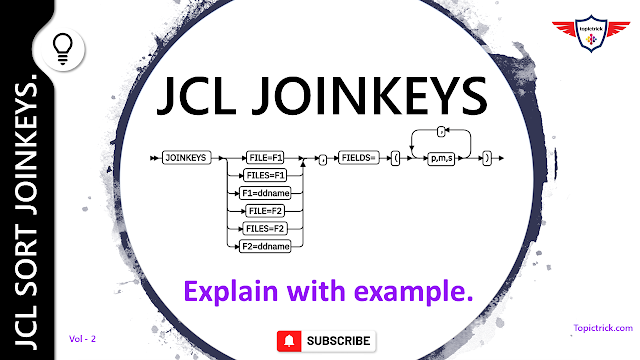
JOINKEYS Syntax. 

A JCL SORT JOINKEYS join operation required two JOINKEYS statements: One for the first file i.e. F1 and the other for the second file i.e. F2. Refer to pictorial representation for more details.  

SORT in JOINKEYS
JOINKEYS Statement

JOINKEYS Sample JCL.

Here is the sample JCL with the control statements for a simple inner join key application using SORT JOINKEYS.

//TMXXAXXX JOB (99999),'MAINFRAME FORUM',CLASS=A,MSGCLASS=X, 
//              MSGLEVEL=(1,1),NOTIFY=&SYSUID
//*
//*   SAMPLE JCL FOR JOINKEYS.
//* 
//STEP01  EXEC PGM=SORT
//SYSOUT   DD SYSOUT=*
//SORTJNF1 DD DSN=MXXP.EMP.PAY.DT001,DISP=SHR
//SORTJNF2 DD DSN=MXXP.EMP.PAY.DT002,DISP=SHR
//SORTOUT  DD SYSOUT=*
//SYSIN DD *
* Control statements for JOINKEYS operation.
  JOINKEYS FILE= F1,FIELDS=(10,2,A,17,4,A)
  JOINKEYS FILE= F2,FIELDS=(20,2,A,23,4,A)
  REFORMAT FIELDS= (F2:1,80,F1:1,80)
* Control statements for main-task (joined records)
SORT FIELDS=COPY
/*

JOIN Statement. 

JOIN control statement in SORT JOINKEYS is an important parameter and if you don't specify this parameter then by default, only paired records from both F1 and F2 files are processed by the main task as joined transaction records. This type of join operation is called an INNER JOIN.

You can use the join statement to specify which records need to be included and processed by the main task. Also, you must specify the UNPAIRED operand. However, F1, F2 and ONLY are optional parameters. 

SORT JOINKEYS
JOIN Statement in JOINKEYS
When you specify the JOIN operands, then SORT JOINKEYS operation will retain the joined records and these records will be processed by the main task as follows:

  • UNPAIRED,F1,F2 or UNPAIRED: Retain unpaired records from both F1 & F2 files along with paired records. This type of join is called as FULL OUTER JOIN.
  • UNPAIRED,F1: Retain unpaired records from the F1 file along with paired records. This type of join is called a LEFT OUTER JOIN.
  • UNPAIRED,F2: Retain unpaired records from the F2 file along with paired records. This type of join is called RIGHT OUTER JOIN.
  • UNPAIRED,F1,F2,ONLY or UNPAIRED,ONLY: Retain unpaired records from F1 and F2 files. 
  • UNPAIRED,F1,ONLY: Retain unpaired records from F1 file. 
  • UNPAIRED,F2,ONLY: Retain unpaired records from F2 file. 

JOINKEYS: SORTED/NOSEQCK parameters.

By default, DFSORT/MFX will sort the input files based on the specified keys. If you know the input file records are already sorted in order, you can use the SORTED parameter to tell DFSORT/MFX to copy file records despite sorting them again. Also, use NOSEQCH operand to tell DFSORT not to check for the order of the records. For example, if you specify:

JOINKEYS FILE=F1,FIELDS=(22,3,A),SORTED,NOSEQCH 
JOINKEYS FILE=F2,FIELDS=(15,3,A),SORTED

JOINKEYS: TYPE parameter.
Another important parameter is TYPE, which is used to specify the processing length for a VSAM input file. For example, if you specify :


  • TYPE=V: DFSORT would use variable-length processing for the VSAM file. 
  • TYPE=F: DFSORT would use fixed-length processing for the VSAM file.

JOINKEYS F1=VSAM1,FIELDS=(23,6,A),TYPE=V
JOINKEYS F2=VSAM2,FIELDS=(16,6,A),TYPE=F

JOINKEYS: INLUCDE/OMIT Parameters.

The performance of SORT JOINKEYS can be improved by using two key parameters i.e. INCLUDE/OMIT. These two parameters are widely used either to include or exclude records from the file during the join operations.
JOINKEYS OMIT
JOINKEYS INCLUDE/OMIT Parameters.

Both parameters can be specified at JOIN statement of JONKEYS. But you should always specify INCLUDE/OMIT parameter in JNF1CNTL or JNF2CNTL. For example:

//*
//* INCLUDE/OMIT Specified at JOIN statements.
//*  
  JOINKEYS FILE=F1,FIELDS=(35,8,A),
     OMIT=(10,15,CH,EQ,C'MAINFRAME FORUM')
  JOINKEYS FILE=F2,FIELDS=(37,8,A),
     INCLUDE=(1,20,SS,EQ,C'TRAN')

//*
//* INLCLUDE/OMIT specified at JFN1CNTL/JNF2CNTL 
//*
//SYSIN DD *
  JOINKEYS FILE=F1,FIELDS=(35,8,A)
  JOINKEYS FILE=F2,FIELDS=(37,8,A)
...
//JNF1CNTL DD *
  OMIT COND=(10,15,CH,EQ,C'MAINFRAME FORUM')
//JNF2CNTL DD *
  INCLUDE COND=(1,20,SS,EQ,C'TRAN')

Example 1: Generate output report with paired transaction records from both F1/F2 without duplicates.

//TMXXXSDX JOB (99999),'MAINFRAME FORUM',CLASS=A,MSGCLASS=X, 
//              MSGLEVEL=(1,1),NOTIFY=&SYSUID
//*
//*   SAMPLE JCL FOR JOINKEYS.
//* 
//STEP01 EXEC PGM=SORT
//SYSOUT DD SYSOUT=*
//SORTJNF1 DD *
  00100       ROGGER    $1000.00
  00200       MURPHY    $2000.00
  00300       CIARA     $3000.00
/*
//SORTJNF2 DD *
  00100       ROGGER    $1000.00  JAN
  00200       MURPHY    $2000.00  JAN
  00300       CIARA     $3000.00  JAN
  00300       CIARA     $3000.00  JAN
/*
//SORTOUT DD SYSOUT=*
//SYSIN DD *
* Control statements for JOINKEYS application
  JOINKEYS FILE=F1,FIELDS=(1,05,A)
  JOINKEYS FILE=F2,FIELDS=(1,05,A)
  REFORMAT FIELDS=(F1:1,5,13,10,F2:33,03,F1:23,8)
* Control statements for main task (joined records)
  OPTION COPY
  OUTFIL REMOVECC,
  HEADER2=(1:'EMPID',11:'F-NAME',26:'EP-SAL',36:'SL-MNTH',/,
  1:7'-',11:14'-',26:7'-',36:7'-'),
  BUILD=(1:1,5,11:13,10,26:23,08,36:33,03)
/*

Output. 

EMPID     F-NAME         EP-SAL   SL-MNTH
-------   -------------- -------  -------
00100     ROGGER         $1000.00 JAN
00200     MURPHY         $2000.00 JAN 
00300     CIARA          $3000.00 JAN

JOINKEYS in JCL Youtube Video: 


SUMMARY.

DFSORT/MFX are powerful data manipulation tools available on the mainframe platform.
These tools have the ability to sort, merge, copy, generate the report for business analysis. JOINKEYS in SORT JCL supports a various number of features such as JOINKEYS, JOIN, REFORMAT, JKFROM, TOJUL, TOGREG, WEEKDAY, DT, DTNS, MERGE operator, MERGE, etc.


►Subscribe to Topictrick & Don't forget to press THE BELL ICON to never miss any updates. Also, Please visit mention the link below to stay connected with Topictrick and the Mainframe forum on - 

► Youtube
► Facebook 
► Reddit

Thank you for your support. 
Mainframe Forum™

Sunday, 10 August 2014

SYNCSORT || SORT INREC || INREC and OUTREC || SORT INREC Examples.

OUTREC
SORT INREC and OUTREC 

In today's blog, I will talk about SORT INREC and OUTREC control statements. These are significant control parameters that is use to improve the efficiency of the JCL SORT. 

Let's start with INREC and OUTREC tutorial.  

SORT INREC and OUTREC Overview. 


The best way to improve SORT/MERGE efficiency is to include only those fields that is required in the output file thus reducing the number of bytes that SORT INREC required to process. 

To do that, you can use the SORT INREC control statement. The INREC control statement re formats the input records. You can use the INREC control statement to perform various data operations such as add, delete, or reformat fields before the records are sorted or merged.

In the similar term, you can use the OUTREC statement to write only certain fields to the sorted output file. In fact, You can also use the INREC and OUTREC statements to reformat the sort/merge records. 

Important Point:

  • The same result may be achieved in some cases by changing the data format of certain fields. For example, if you need to change the format of a ZD field to PD, which reduces the number of bytes for the field, it is more efficient to use INREC rather than OUTREC for the conversion. Additionally, for SORT/MERGE processing PD fields are processed more efficiently than ZD fields. 
  • The OUTREC processing isn’t done until the sorting or merging is finished. So while it still improves I/O operations by limiting the amount of output that’s written, it doesn’t have as big an effect on processing efficiency as using the INREC statement does.


The syntax of the INREC and OUTREC statements 

INREC  FIELDS=([c:][separation-fld,]position,length[,align,]…)
OUTREC FIELDS=([c:][separation-fld,]position,length[,align,]…)

INREC/OUTREC Parameter explanation: 


c:
Describe the column (byte) in which a data field or separation field should be placed, relative to the start of the record. If the column settings that are coded skip over any bytes, those bytes are filled with spaces.

separation-fld
Tells the sort/merge utility to insert a constant value into the record. The constant can be specified in one of these forms:

nX

Inserts n repetitions of spaces

nZ

Inserts n repetitions of binary zeros

nC’text’

Inserts n repetitions of the specified text

nX’hex’

Inserts n repetitions of the specified hex value

If n is omitted, one repetition of the specified constant is inserted.

position

The location of the first byte of the field.

length

The length of the field in bytes.

align

Tells the sort/merge utility to align the field on a halfword (H), fullword (F), or doubleword (D) boundary, but this shouldn’t be necessary on a modern system.


SORT INREC Example: 

//RCMX01   JOB  (JOB CARD...)          Gives the Jobname
//         EXEC PGM=SORT               Identifies the Program
//SYSOUT   DD SYSOUT=*                 
//SORTIN   DD DSN=RC01.PAYROL.JAN,DISP=SHR 
//SORTOUT  DD SYSOUT=* 
//SORTWK01 DD SPACE=(CYL,10),UNIT=SYSDA 
//SYSIN DD *
  INREC FIELDS=(1,9,74,2)
  SORT FIELDS=(10,2,PD,D) 
/*


INREC Example: Just use the data in bytes 1-50 of the input records.

INREC FIELDS=(1,50)

Example 1: Just use the data in bytes 1-50, 75-99, and 125-174 of the input records.

INREC FIELDS=(1,50,75,25,125,50)

Example 2: The output records contain only the data in bytes 1-80 and bytes 100-124 of the input records.

OUTREC FIELDS=(1,80,100,25)

Example 3: The output records start with the data in bytes 100-124 of the input records, followed by the data in bytes 1-80.

OUTREC FIELDS=(100,25,1,80)

Example 4: The output records start with four blank spaces followed by the character E in byte 5, followed by another blank space, then the data from bytes 1-80 of the input records starting in byte 7, and finally, ten blank spaces.

OUTREC FIELDS=(5:C'E',7:1,80,10X)

Saturday, 10 August 2013

JCL IEHLIST Utility | IBM IEHLIST Utility Example [IEHLIST Utility in JCL Example].


IEHLIST Utility.


Welcome back to another interesting JCL Tutorial on "IEHLIST" in JCL. In this session, you'll learn the basics of the IEHLIST utility. You'll also go through the IEHLIST examples to understand how the IEHLIST utility is used to list entries?

Let's get started with the introduction to JCL

Agenda. 
  • Introduction to JCL. 
  • What is IEHLIST Utility in JCL?
  • IEHLIST utility in JCL Example.
  • Conclusion.


Introduction to JCL. 


The term JCL stands for Job Control Language. Job Control Language is the command language of the IBM z/OS.  JCL defines a job by furnishing information that distinguishes the programs to be executed and the data to be processed. JCL tells the operating system what to do.


What is IEHLIST Utility?


IBM Utility, IEHLIST utility in JCL

JCL IEHLIST Utility

Utility programs are pre-written applications, generally used in IBM Mainframes by system programmers and application developers to perform day-to-day maintenance tasks.

IEHLIST utility in JCL is another important system utility popularly used in Mainframe. It is generally used to list entries in the directory of one or more partitioned data sets or PDSEs, or entries in an indexed or non-indexed volume table of contents.

Any number of listings can be requested in a single execution of the program.

Let's focus on JCL IEHLIST Utility in JCL Examples.
 

Example 1: List Partitioned Directories Using DUMP and FORMAT.

In this IEHLIST utility example, the directory of a PDSE is listed. In addition, the directories of two partitioned data sets that reside on the system residence volume are listed.

//TPLSTDR0 JOB (38912),‘MAINFRME',MSGCLASS=X,MSGLEVEL=(1,1),
//             CLASS=A,NOTIFY=&SYSUID
//STEP1    EXEC PGM=IEHLIST
//SYSPRINT DD SYSOUT=*
//DD1      DD UNIT=DISKA,VOLUME=REF=SYS1.NUCLEUS,DISP=OLD
//DD2      DD UNIT=DISKD,VOLUME=SER=33322,DISP=OLD
//SYSIN    DD *
  LISTPDS DSNAME=RC42.PDSE1.FLE,VOL=DISKA=222222
  LISTPDS DSNAME=(RC55.PART1,D55.PART2),FORMAT
/*

The control statements are as follows:
  • DD1 DD statement defines the system residence device.
  • DD2 DD statement defines a device on which a disk volume (333222) is mounted.
  • SYSIN DD statement defines the control data-set, which follows in the input stream. The first IEHLIST LISTPDS statement indicates that the PDSE directory belonging to data set RC42.PDSE1.FLE is to be listed. The listing is in unedited (dump) format. This data set resides on volume 222222.
  • The second LISTPDS statement indicates that partitioned data set directories belonging to data sets RC55.PART1 and D55.PART2 are to be listed. The listing is in an edited format. These data sets exist on the system residence volume.

Example 2: List Non-indexed Volume Table of Contents [IEHLIST listvtoc]


In this example, a non-indexed volume table of contents is listed in the first edited format. The edited listing is supplemented by an unedited listing of selected data set control blocks.

//TPLSTDR0 JOB (38912),‘MAINFRAME',MSGCLASS=X,MSGLEVEL=(1,1),
//             CLASS=A,NOTIFY=&SYSUID
//STEP1    EXEC PGM=IEHLIST
//SYSPRINT DD SYSOUT=A
//DD2      DD UNIT=DISK,VOLUME=SER=111111,DISP=OLD
//SYSIN    DD *
  LISTVTOC FORMAT,VOL=DISK=111111
  LISTVTOC DUMP,VOL=disk=111111,DSNAME=(SET1,SET2,SET3)
/*

Conclusion.


Finally, this marks the end of today's IEHLIST in JCL Tutorial. JCL IEHLIST is an IBM-supplied utility that is used for list entries. You can also include IEHLIST from Rexx. Do check out our mainframe blog for more tutorials on REXX. JCL, COBOL, etc.

Subscribe to Topictrick & Don't forget to press THE BELL ICON to never miss any updates. Also, Please visit mention the link below to stay connected with Topictrick and the Mainframe forum on - 

► Youtube
► Facebook 
► Reddit

Thank you for your support. 
Mainframe Forum™
IEHLIST
Share IBM IEHLIST Utility Example. 

Created with Artisteer

Sunday, 28 July 2013

JCL SORT | JCL SORT CARDS | JCL SORT COND

JCL Sort.
JCL Sort.

Sequential files are still commonly used in mainframe shops to store transaction records. Then, before the records in these files can be processed, they often need to be sorted or merged into an appropriate sequence. For instance, sales transactions may need to be sorted into salesperson, customer, or item number sequence before they can be used to prepare reports or update master files. 

To do this sorting or merging, you use the sort/merge utility that comes with OS/390. As you will see, you normally use JCL to run this utility as a standalone program. However, you can also use this utility to do an internal sort or internal merge within an application program. 

The JCL requirements for sorting


Sort the records in a file, the sort/merge utility (or program) reads the records from one or more input files, sorts them based on the data in one or more control fields (or sort keys), and writes the sorted records to an output file. 

If you want to sort two or more files at the same time, you can concatenate them like this: 

//SORTIN DD DSNAME=RC01.INVOICE.TRANS.APRIL,DISP=SHR 
//       DD DSNAME=RC01.INVOICE.TRANS.MAY,DISP=SHR
//       DD DSNAME=RC01.INVOICE.TRANS.JUNE,DISP=SHR

This assumes of course that the control field is in the same location in all of the files.

Although the JCL for this job step provides for only one work file, you can provide for more than one. Either way, the space allocation for the work files should be about twice the combined sizes of the input files. That extra space lets the sort/merge program work more efficiently while it does the sorting.


JCL Sort Utility
JCL Sort.

The DD statements required by a sort
ddname
Use
SORTLIB
A partitioned data set that contains the modules required by the sort/merge utility. Normally, SYS1.SORTLIB.
SYSOUT
The messages produced by the sort/merge utility. Normally, a SYSOUT data set.
SORTIN
The input file or files to be sorted. If more than one file is to be sorted, you can concatenate them.
SORTOUT
The sorted output file. It can be a new non-VSAM file with DISP=(NEW,KEEP) or DISP=(NEW,CATLG); an extension of an existing non-VSAM file with DISP=MOD; or an existing VSAM file.
SORTWKnn
The work files that are required by the sort, where nn is a consecutive number starting with 01. One or two files are usually adequate, and the total DASD space allocated to the work files should be about twice the input file size. You can specify up to 255 work files.
SYSIN
The sort control statements. Normally, an instream data set.

Example: Sample SORT JCL.


//RCORT01 JOB  (...JOB CARD..) 
//SORT    EXEC PGM=SORT
//SORTLIB DD DSNAME=SYS1.SORTLIB,DISP=SHR
//SYSOUT  DD SYSOUT=*
//SORTIN  DD DSNAME=RCKT10.INVOICE.TRANS,DISP=SHR
//SORTOUT DD DSNAME=RCKT10.INVOICE.TRANS.SORTED,DISP=(NEW,CATLG),
//                  UNIT=SYSDA,VOL=SER=MPS8BV,
//                  SPACE=(CYL,(10,5))
//SORTWK01 DD UNIT=SYSDA,SPACE=(CYL,(20,5))
//SYSIN    DD * 

  SORT FIELDS=(9,5,CH,A)
/*


New In-feed ads